Remember Source Page
Content copied from Chrome and Safari browsers will accurately record the source page address, so your inspiration never gets lost. Anytime, you can quickly return to the original page, review the context, and ensure important information is not lost.
Feature Overview
When you copy text or images in a browser, DPaste automatically records the source webpage information of that content, including:
- Source Page URL: Complete webpage address
- Page Title: Webpage title information
- Website Icon: Website favicon icon
- Domain Information: Easy to quickly identify the source website
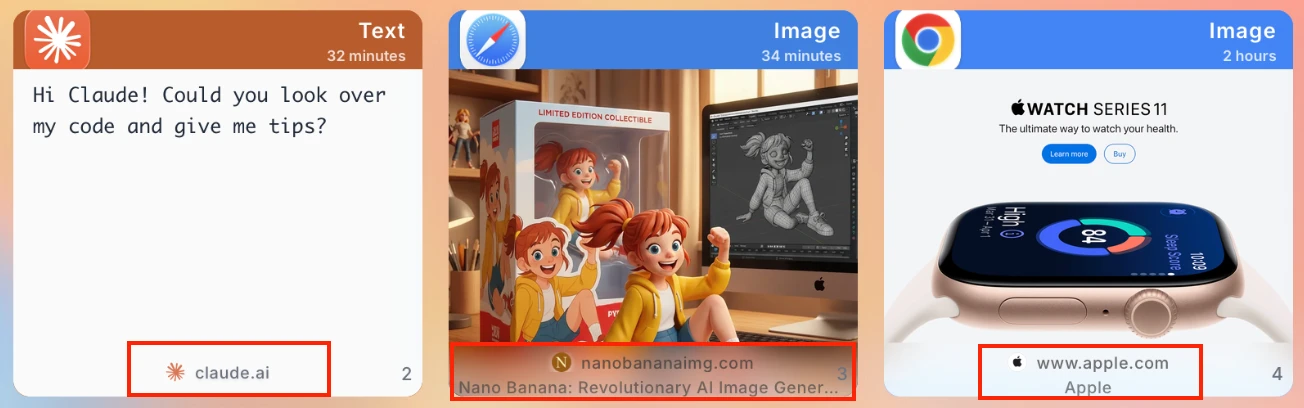
This information will be displayed at the bottom of the clipboard history card, allowing you to identify the source of the content at a glance.
View Source Information
View in Card
Source page information will be automatically displayed at the bottom of the clipboard card:
- First Line: Displays website icon and domain (e.g.,
example.com) - Second Line: Displays complete page title (if available)
Operations via Right-click Menu
For records with source page information, the right-click menu provides the following options:
- Open Source Webpage: Open the original page in the default browser
- Copy Source Webpage URL: Copy the source page URL to the clipboard

Use Cases
- Research & Learning: After copying paper or document fragments, need to return to the original text to view the full context
- Code Reference: After copying code examples, quickly return to GitHub or documentation pages to view complete code
- Information Collection: When collecting information across multiple web pages, you can always trace the source
- Content Verification: When you need to confirm the accuracy of copied content, quickly return to the original page to verify
- Inspiration Tracking: Record creative sources for easy follow-up reading or citation
Supported Browsers
Currently supports automatic source page recording for the following browsers:
- Chrome
- Safari
No plugin installation required to use.
Chrome Extension (Coming Soon)
Because many web pages have access restrictions, to better obtain webpage title and other information, you can install the DPaste browser extension for the best experience:
- Open Chrome Web Store
- Search for "DPaste Connector"
- Click "Add to Chrome" to install the extension
After installation, the extension will work silently in the background, automatically recording source page information without any configuration.
All source information is stored locally and will not be uploaded to the server, protecting your privacy and security.